![white_logo.png]](https://help.happyhotel.io/hs-fs/hubfs/white_logo.png?height=32&name=white_logo.png)
Restrictions control when a rate can be booked on a given day. For example, guests should stay at least two nights over a trade fair weekend. Or nobody should arrive on a Sunday.
You manage restrictions directly in the happyhotel price calendar. We send them to your PMS, and from there they go through your channel manager to your booking channels.
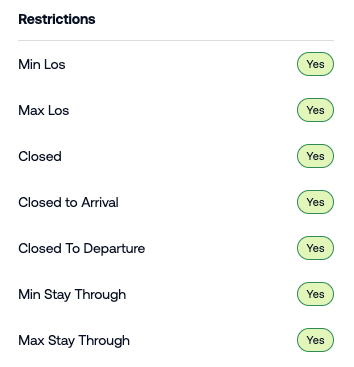
Which restrictions are there?
- Min. stay: Guests arriving on this day must book at least this many nights.
- Max. stay: Guests arriving on this day can book at most this many nights.
- Min. stay through: Every stay that includes this night must be at least this many nights long, no matter which day the guest arrives.
- Max. stay through: Every stay that includes this night can be at most this many nights long.
- Closed for arrival: Nobody can arrive on this day. Stays running across the day are still possible.
- Closed for departure: Nobody can leave on this day.
- Closed: The rate can't be booked on this day. Arrivals, departures and stays running across the day are all blocked.
A restriction always applies to one rate on one day. If a restriction should apply to several rates, select all of them when you set it.
Which restrictions can I use?
That depends on your PMS. happyhotel only shows you the restrictions your PMS can store.
To see what your PMS supports:
- Open Settings > Integrations.
- On your PMS card, the Restrictions section lists every type that gets sent.
If the section is missing, your PMS can't receive restrictions from happyhotel.