![white_logo.png]](https://help.happyhotel.io/hs-fs/hubfs/white_logo.png?height=32&name=white_logo.png)
There are three ways to start:
- Select several days: In the price calendar, click a day, hold the mouse button and drag across the days you want. Then right-click the selection and choose the restrictions.
- From the menu: Click the three dots at the top right of the price table and choose Set restrictions.
- For one day: In the price calendar, click straight into the day's restriction row.
The Edit restrictions window opens.
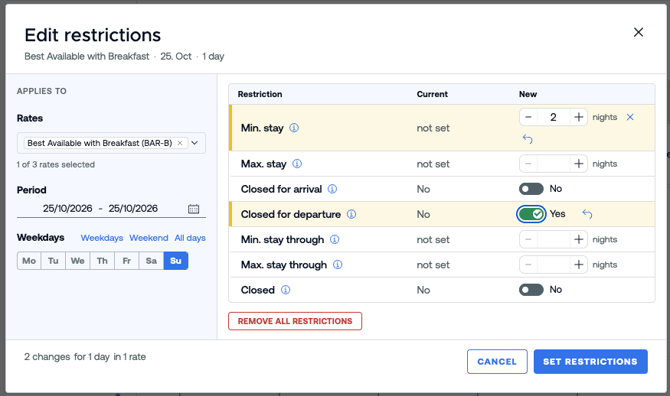
Setting restrictions
- Applies to: Select the rates the restriction should apply to. Rates you set as default in the settings are already selected. Check that only the rates you want to change are selected.
- Period: Choose a start and end date. You can edit up to two years at once.
- Weekdays: Choose the days of the week the restriction applies to. Weekdays, Weekend and All days select a whole group at once. Example: a minimum stay only for arrivals on Friday and Saturday.
- Restrictions: Each row shows today's value under Current. Enter the value you want under New.
- For stay lengths, set the number of nights with - and + or type it in.
- For arrival, departure and closed, turn the restriction on or off with the switch.
- If mixed shows under Current, the selected period has different values. Your new value replaces all of them.
- At the bottom you see how many changes will be saved for how many days and rates. Click Set restrictions.
If you change more than 90 days or several rates at once, happyhotel asks again. Confirm with Apply.
What happens after saving?
happyhotel sends the restrictions to your PMS as soon as possible. While that's running, you see a loading icon in the calendar. After that, your PMS or channel manager passes the restrictions on to your booking channels.
For long periods it can take a few minutes until every channel is updated.
Good to know
- You can't change restrictions for days in the past.
- The rate needs a price for a day first. If it's missing, set a price and try again.
- The minimum stay can't be longer than the maximum stay.
- If a day is Closed, the stay lengths have no effect on that day.
- You can't set restrictions on virtual rates. Select the underlying rate instead.
- If the selected period has open restriction suggestions, the editor tells you. Saving discards those suggestions. More in Restriction suggestions for the minimum stay.
- If you change a restriction directly in your PMS, it can take until the next day before happyhotel shows the new value, depending on your PMS.