![white_logo.png]](https://help.happyhotel.io/hs-fs/hubfs/white_logo.png?height=32&name=white_logo.png)
You remove restrictions in the same window where you set them.
- Open Edit restrictions as described in Setting and changing restrictions.
- Select rates, period and weekdays.
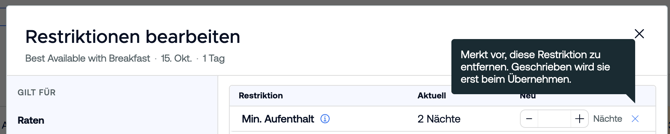
- Remove the restrictions:
- One restriction: Click Remove restriction in its row. The row then shows "will be removed".
- All restrictions: Click Remove all restrictions and confirm with Queue removal.
- Click Set restrictions.
Nothing changes until you click that button. If you made a mistake, undo a row with Reset or close the window with Cancel.
Reopening a closed day
The price calendar shows a closed day in grey with the label Closed. To reopen it:
- Select the day in the price calendar and open the editor with a right-click or the three dots.
- Turn Closed off or click Remove restriction.
- Click Set restrictions.