![white_logo.png]](https://help.happyhotel.io/hs-fs/hubfs/white_logo.png?height=32&name=white_logo.png)
Under Settings > Restrictions you set two things: which rates restrictions apply to by default, and whether happyhotel makes minimum stay suggestions for you.
Default rate plans
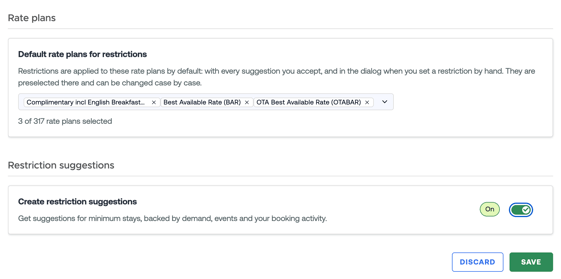
Under Default rate plans for restrictions you select the rates restrictions normally apply to. These rates are
- preselected in the Edit restrictions editor and
- included when you apply a suggestion.
You can always change the selection case by case. If you don't choose any default rates, the price calendar only preselects the rate you're working in.
Turning suggestions on or off
- Set Create restriction suggestions to On or Off.
- Click Save.
If you turn suggestions off, happyhotel stops creating new ones from the next night on. Restrictions you already applied stay in place.
If Paused · pricing algorithm stopped shows next to the switch, no suggestions are being made right now because your pricing algorithm isn't running. Our support team takes care of it.
"Restriction suggestions are not (yet) possible for this property"
The page tells you why:
- Your PMS cannot store a minimum stay. Suggestions aren't possible with your PMS.
- No pricing algorithm is set up for this property yet. Suggestions are based on our demand forecast. Talk to your contact at happyhotel.
- You are currently on our simpler pricing model. The simpler pricing model doesn't have suggestions yet.
- Restriction suggestions are not included in your current plan (Free). Upgrade now takes you to a plan with suggestions.
- No Revenue Rate is set up for this property yet. Suggestions always refer to a Revenue Rate.
- You use several Revenue Rates. / Your Revenue Rate is a virtual rate. We're working on this. The link on the page lets you book a call with our product manager and get early access.
- This property runs on demo data. The suggestions shown are examples. Real suggestions appear once booking data from your PMS comes in.