![white_logo.png]](https://help.happyhotel.io/hs-fs/hubfs/white_logo.png?height=32&name=white_logo.png)
Restrictions show up as their own rows above the prices. You choose which rows you see for each view.
Showing and hiding restriction rows
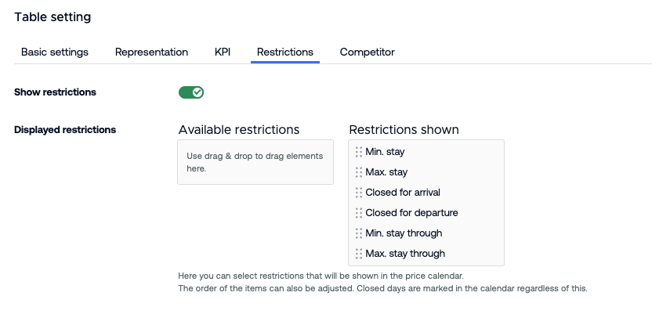
- In the price calendar, click Edit view.
- Switch to the Restrictions tab.
- Turn on Show restrictions.
- Drag the restrictions you want from Available restrictions to Restrictions shown. You can change the order with drag and drop.
- Save the view.
happyhotel always marks closed days, even if you haven't turned on any restriction rows.
How to read the rows
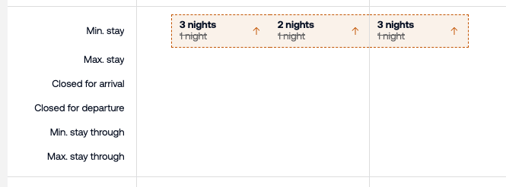
- Number with "nights": A minimum or maximum stay applies to this day.
- Tick: Closed for arrival or closed for departure is set.
- Empty cell: No restriction. A minimum stay of 1 night doesn't count as a restriction, so it isn't shown.
- Grey day with "Closed": The rate can't be booked on this day.
- Bold value with an arrow: There's a restriction suggestion here. More in Restriction suggestions for the minimum stay.
If the tab has no restrictions to choose from, your PMS doesn't support restrictions. More in Restrictions: what they are and which ones there are.