![white_logo.png]](https://help.happyhotel.io/hs-fs/hubfs/white_logo.png?height=32&name=white_logo.png)
The happyhotel price algorithm is set up exactly for your hotel and customised to your needs during onboarding.
Machine learning (a branch of artificial intelligence) is used to create a forecast for RevPAR, which is used as an indicator of demand.
The forecast RevPAR is then used to determine a price using a function.
The data is based on various historical factors such as seasonality, school holidays, events, days of the week or the days remaining until arrival. This is combined with an analysis of the current booking situation (on the books or OTB for short), which is also compared with the forecast.
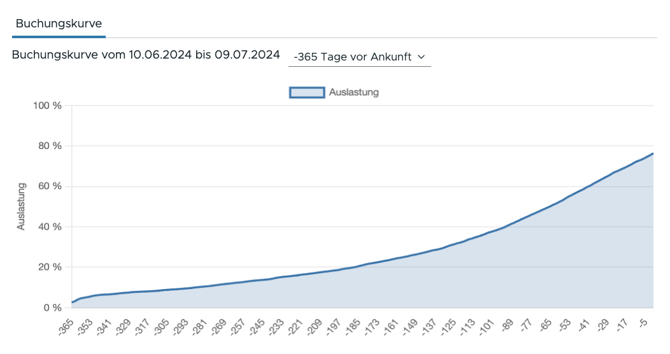
The graphical representation of occupancy over time is known as the booking curve and can be seen in the following diagram. By continuously comparing OTB data with our forecast, the algorithm regulates itself and adjusts the prices to your guests' willingness to pay.
Normally, the price suggestions are always generated by the algorithm for a reference rate and then adjusted to the remaining rates. The intervals between rates are set during onboarding according to your price list. Optionally, several revenue rates can also be defined, for example, to map other tariffs from a certain length of stay of the customer (e.g. short stay, mid stay, long stay).
The weather is currently not taken into account in the price algorithm.
Settings for the price algorithm
In the settings, you have the option of viewing the stored configurations for the price algorithm. In the following, I will explain the individual points in more detail to give you a better understanding of their importance:
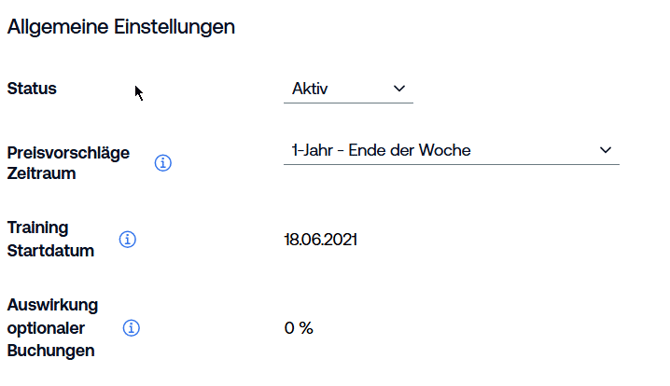
1. Status
The status indicates the current state of the algorithm:
Active: The algorithm is active and generates price suggestions. These suggestions can also be accepted by the autopilot.
Deactivated: The algorithm has been deactivated by the supporter and therefore no more price suggestions are generated and no calculations take place.
Under review: The algorithm was included in the review due to a change and must be approved by the supporter. Price suggestions are actively generated but can no longer be accepted by the autopilot, as the autopilot is deactivated.
Stopped: The algorithm has been stopped due to a technical problem and can no longer generate price suggestions. New training is necessary and must be checked by the supporter.
2. Price suggestions for period
The duration of the periods depends on the selected tariff.
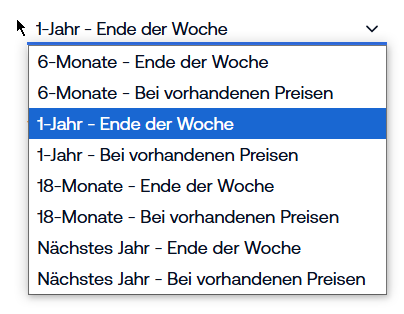
a. Meaning of ‘end of week’
If the ‘"End of week’ setting is selected, the Sunday of the current week is always meant. In this case, the system generates prices until the last day of the week, i.e. Sunday.
Example: If you select a duration of one year ‘until the end of the week for the price adjustment, prices will be generated until 7 November 2025 (assuming that the current day is 5 November 2024).
b. Meaning of ‘Existing prices’
With the ‘Existing prices’ option, new prices are only generated for the days on which prices have already been entered in the PMS (Property Management System). This means that the system only adjusts prices for the days for which a price is already stored in the revenue rate of the PMS.
Example: If you select the ‘1 year of existing prices’ option, the system will generate prices for all days up to 4 November 2024, provided a price has been entered in the PMS on these days.
‘Next year means that the price suggestions will be submitted by the end of the coming year.
In 2024, it would say ‘by the end of 2025’.
From January 2025, it would say ‘until the end of 2026’.
c. Frequency of adjustments to existing prices
The frequency with which the system adjusts the prices for existing prices can vary depending on the tariff. In the standard case, however, a price adjustment is made every 3 hours.
Note: The exact adjustment frequency may vary depending on the tariff. Contact support or check the tariff details for more information.
3. Training start date
The algorithm trains its calculations on the basis of past data. Here you can see the date from which the data is taken from the past.
4. Effect of optional bookings
This value specifies the percentage of optional bookings to be taken into account (lies between 0 and 1).
5. Advanced Settings for the Price Algorithm
-
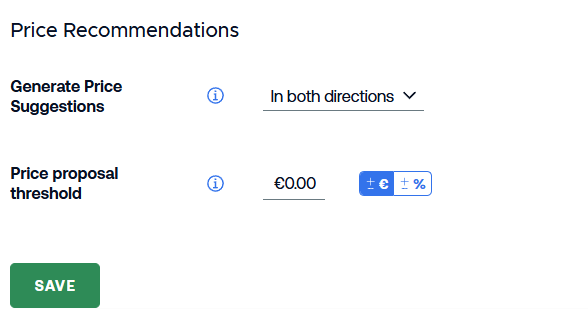
Threshold for Price Suggestions
-
You can define a minimum deviation value from the current price.
-
A price suggestion is only generated if the deviation from the current price is greater than or equal to this threshold.
-
This helps to avoid very small price changes and reduces the number of generated price suggestions.
-
This setting is also used by the Autopilot.
-
-
Direction of Price Suggestions
-
You can define whether price suggestions are:
-
only upwards,
-
only downwards,
-
or allowed in both directions.
-
-
-
Important Notes
-
This setting does not work in combination with price levels and is intended as an alternative to them.
-
Existing price suggestions remain unchanged.
-
The change only becomes effective with the next run of the price algorithm.
-