![white_logo.png]](https://help.happyhotel.io/hs-fs/hubfs/white_logo.png?height=32&name=white_logo.png)
- In the price calendar, open the Restriction suggestions sidebar, or click a suggestion in the calendar.
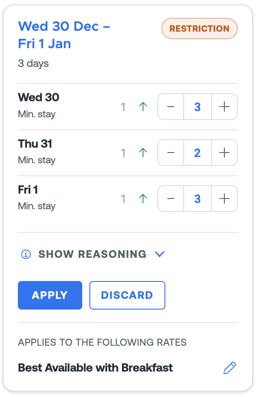
- Each suggestion is a card. It shows the period, the current and the suggested minimum stay for each day, and a short reason.
- Choose Apply or Discard.
Apply
- You can adjust the suggested values for each day before you apply them.
- Under Applies to the following rates you can select more rates that should get the same minimum stay.
- With Apply, happyhotel sends the minimum stay to your PMS, the same way as a manual change.
- Your prices don't change.
Discard
- Click Discard.
- Under Why doesn't the suggestion fit? you can add a short reason, for example "This event doesn't bring us guests" or "Too far in the future". The comment is optional, but it helps us a lot.
- Confirm with Confirm rejection. Nothing changes in your PMS.
What happens to suggestions I don't act on?
Open suggestions stay as long as they still fit the current situation. If the situation changes, for example because bookings get cancelled, the suggestion disappears in the next nightly run or a new one replaces it.
What if I change the minimum stay myself?
If you set restrictions yourself in Edit restrictions for a period that still has open suggestions, happyhotel tells you. Saving discards those suggestions, because your decision comes first.