![white_logo.png]](https://help.happyhotel.io/hs-fs/hubfs/white_logo.png?height=32&name=white_logo.png)
Important information: The images can be enlarged by right-clicking them and then selecting ‘Open image in a new tab’.
This setting should always be made by the supporter in order to avoid possible circumstances!
The availabilities are normally pulled automatically from your PMS. Therefore, nothing should be done here.
Availabilities
For the room categories, you can also add the availability of the individual categories. This means that happyhotel can determine when a room category is available and when it is not, and this information is also forwarded to the PMS accordingly. Here, the video shows a short presentation of the setting:
This makes it easy to see that availability overrides the standardised, unlimited availability and allows you to adjust the number of rooms per category that should be available or bookable in a specific period.
→ If the period is set here to 0 to 0, it always applies. If the period from day X to ‘open’ is set, it applies from the date entered.
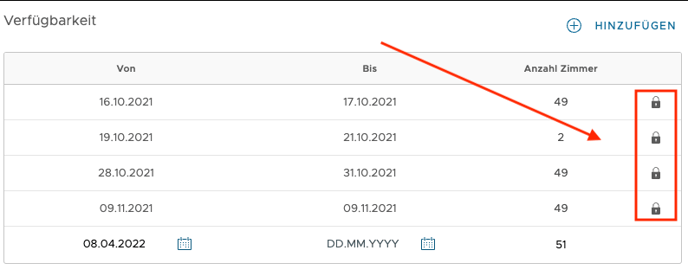
→ Availabilities that have a lock are those that have been transferred from the PMS to happyhotel. These availabilities cannot be changed in happyhotel.
However, changing availability is an issue that can often be solved by the PMS or Channel Manager. It is therefore often sufficient to leave the room categories in happyhotel untouched.